 Pictius Free image editor in your browser
Open and edit PSD files online
Pictius opens PSD files directly in your browser, with their layers, groups, masks, adjustment layers, text and most layer effects. You can edit them, save them as PSD again or export a flat PNG or JPG. When something in the file cannot be reproduced exactly, Pictius tells you what and on which layers, instead of changing it silently.
- Free
- No install, no account
- Images stay on your device
- Layers, masks and AI
How to open a PSD file
The file is read on your device, in a background worker, and nothing is uploaded.
- Choose File ▸ Open… (Ctrl+O) and pick the .psd file, or drag it from your desktop onto the editor. Each file opens in its own tab.
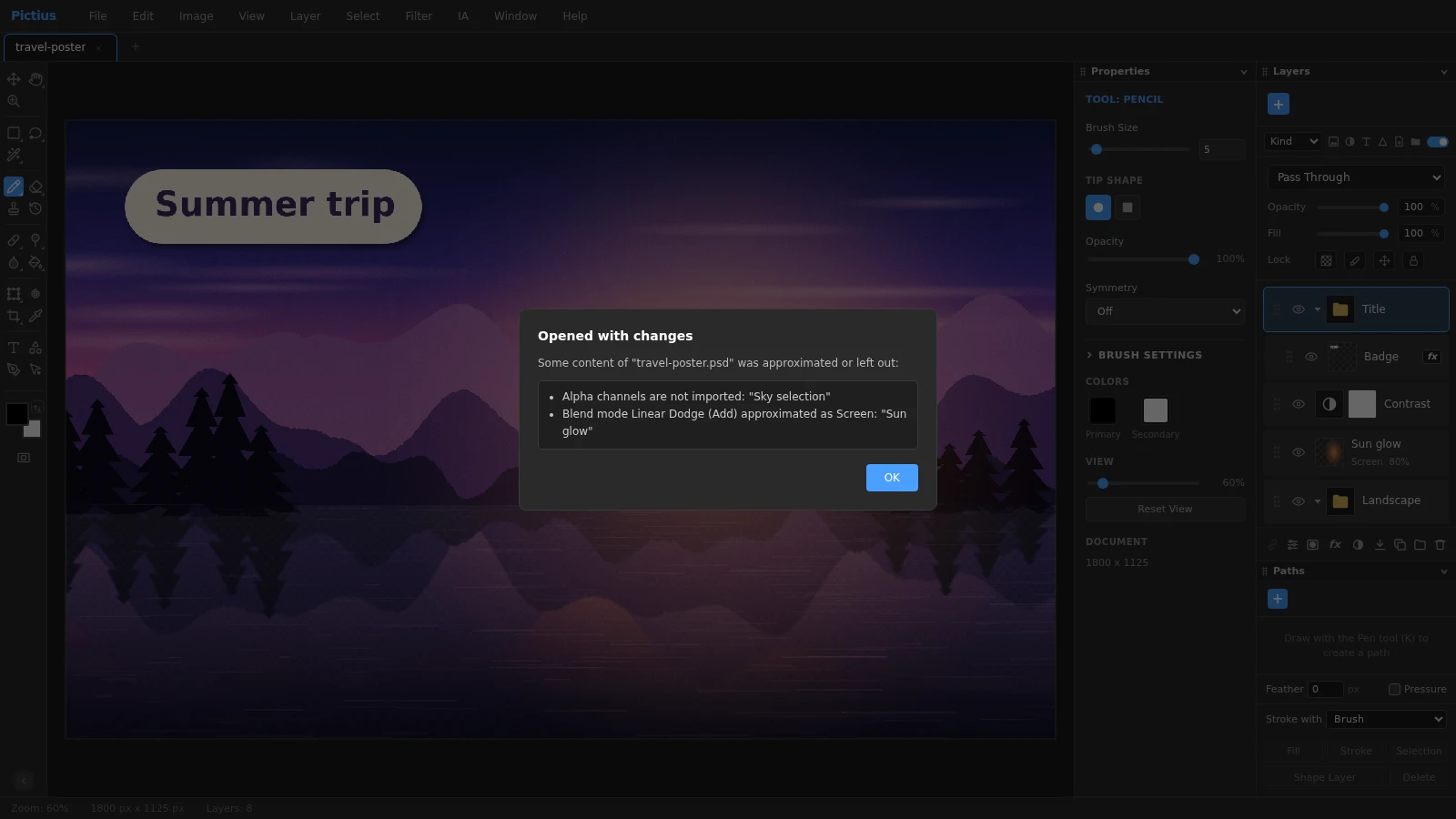
- If anything had to be changed, the Opened with changes report appears. It groups the issues by topic and names the layers involved. Read it, then click OK.
- Edit as usual: show and hide layers, double-click an adjustment layer’s icon to change its settings, click on text with the Text tool (T) to retype it, or paint on a layer mask.
- To get a PSD again, choose File ▸ Save a Copy as PSD. File ▸ Save (Ctrl+S) stores a .pictius project instead, and File ▸ Export As… (Ctrl+Alt+Shift+W) writes PNG, JPG, WebP and other formats.
What is kept
Most of a typical layered PSD comes through as editable layers:
- The layer tree: groups, names, visibility, opacity, fill opacity, clipping masks, locks and linked layers. Artboards become groups.
- Blend modes. The ones Pictius has are kept exactly; the rest, such as Linear Dodge or Vivid Light, are replaced with the closest one.
- Layer masks, and vector masks of pixel layers, which become pixel masks.
- Adjustment layers: Brightness/Contrast, Levels, Curves, Exposure, Vibrance, Hue/Saturation, Color Balance, Black & White, Photo Filter, Channel Mixer, Invert, Posterize, Threshold, Gradient Map and Selective Color.
- Layer effects, which become layer styles you can edit: Drop Shadow, Stroke, glows, Satin, Bevel & Emboss, and color and gradient overlays.
- Text layers, which stay editable with their fonts, colors and spacing, plus solid color shape layers, fill layers, smart objects with embedded contents, and guides.
What is approximated or left out
Everything in this list is reported when you open the file, with the names of the layers it affects:
- Files with 16 or 32 bits per channel are converted to 8 bits.
- A font that is not installed on your computer is replaced with Arial. Vertical text and text on a path become plain horizontal text.
- Pattern Overlay effects, layer comps and extra alpha channels are not imported.
- Smart objects with smart filters, warps or no embedded file are opened as pixels, and so are shape layers that cannot be rebuilt.
Saving back to PSD
Save a Copy as PSD writes groups, masks, adjustment layers, text layers, layer styles, solid color shapes and smart objects, together with a flattened preview so other apps can show a thumbnail. It does not change the file you are working on. If anything cannot be written, such as a Pattern Overlay effect, an Exported with changes report lists it.
While you work, save as .pictius: it keeps everything Pictius can do, and you can export a PSD at the end.
Frequently asked questions
Is my PSD file uploaded anywhere?
No. Pictius reads and writes PSD files in your browser, on your own computer. That makes it a safe choice for client work and unreleased designs.
Why do some layers look slightly different?
Usually because of a blend mode or an effect that Pictius approximates, or a missing font. The Opened with changes report names each case and the layers involved, so you can check them one by one.
Can I edit the text in a PSD file?
Yes. Text layers open as editable text: click on the text with the Text tool (T), or double-click the layer’s thumbnail in the Layers panel. If the font is not installed on your computer, Arial is used instead.
Does Save overwrite my PSD file?
No. Save writes a .pictius project. To get a PSD, use File ▸ Save a Copy as PSD, which writes a separate file and leaves your document as it is.
Can I convert a PSD to PNG or JPG?
Yes. Open the file and choose File ▸ Export as PNG, File ▸ Export as JPG, or File ▸ Export As… to set the quality and the scale. The visible layers are flattened into one image.
Can it open PSB files?
No, only .psd files. A PSB document embedded inside a smart object of a PSD file is read, though. Very large PSD files are limited by the memory your browser can use.
Image editing guides
- Remove the background from an imageRemove the background from a photo in your browser: select the subject with AI, refine the edges with a layer mask and export a transparent PNG. No uploads.
- Remove objects from a photoErase unwanted objects, people or text from a photo: select them and use Content-Aware Fill, AI Fill, Spot Healing or Patch. Everything runs in your browser.
- Cut out hair and objects preciselyCut out people, hair, pets and products: start with Quick Selection or Select Subject, refine the edge in Select and Mask and output a layer mask or a new layer.
- Blur the background of a photoBlur the background of a photo to make the subject stand out: use Portrait Mode, or select the subject and apply Gaussian Blur to the rest. Free, in your browser.
- Resize an imageResize an image to exact pixels or a percentage with Image Size, choose the resampling method, and add or trim space around it with Resize Canvas. Free and private.
- Crop and straighten a photoCrop a photo to a ratio such as 1:1, 4:5 or 16:9, straighten a tilted horizon, fix perspective with Perspective Crop and trim empty borders. Free, in your browser.
- Upscale an imageEnlarge a small image with Super Resolution 2x, which doubles its size with smooth interpolation and sharpening, or pick an exact size and method in Image Size.
- Convert an image to another formatConvert images in your browser: open PNG, JPG, WebP, AVIF, GIF or PSD files and export PNG, JPG, WebP, GIF, SVG, PDF or TIFF with the quality and scale you choose.
- Images at the right size for social mediaMake images at the right size for Instagram, Facebook, YouTube and more: crop to a preset ratio or use Export for Social Media to resize and save in one step.
- Add text to an imageAdd text to a photo with editable text layers: set font, size, color and spacing in the Character and Paragraph panels, then add a shadow or stroke with Layer Style.
- Add a watermark to your photosAdd a text or logo watermark to a photo, set its opacity and blend mode, then record it as an Action and apply it to many images at once with Batch.
- Adjust color and exposureFix dark, flat or off-color photos with Levels, Curves, Hue/Saturation and Shadows/Highlights, and keep every edit reversible with adjustment layers.
- Remove blemishes and red eyeRetouch portraits in your browser: remove spots and blemishes with Spot Healing and Healing, clone away distractions with Clone Stamp and fix red eye with one click.
- Layers and masks explainedLearn layers in Pictius: groups, blend modes, layer masks and clipping masks, adjustment layers, and .pictius project files that keep every layer editable.
- Batch edit images with ActionsRecord your edits once as an Action and play it on many images with Batch: resize, adjust, watermark and export them all in one go, right in your browser.